Why are installation and location so crucial?
The best digital signage hardware and the most compelling content are of little use if the display is installed in the wrong place or technical details are neglected. A well-thought-out installation and the right choice of location are crucial for the visibility, security, and impact of your digital signage solution. In this article, you will learn what to look out for and how to provide your customers with the best possible advice.
The most important factors when choosing a location
1. Visibility and attention:
Choose locations with high foot traffic and eye contact with your target audience. Ideal places are entrance areas, waiting areas, near cash registers, shop windows, or main traffic routes. The goal: your message should not be overlooked! In large buildings or shopping malls, you should analyze the natural walking routes and use hotspots for placement.
2. Viewing distance and height:
Adjust the display size and mounting height to the typical distance of the viewers. Larger displays or video walls are recommended for large areas and high ceilings. Rule of thumb: The center of the display should be at eye level for the target audience – usually between 1.60 and 1.80 meters. For ceiling mounting (e.g., in train stations), a slight tilt may also be useful.
3. Lighting conditions:
Consider both natural and artificial light. Shop windows and outdoor areas require particularly bright displays, with anti-glare coating if necessary. Avoid direct sunlight on standard displays, as this severely impairs visibility. Also check whether light sources change throughout the day (e.g., due to the position of the sun).
4. Accessibility and maintenance:
Ensure that technology, power supply, and network connections are easily accessible. Allow sufficient space for maintenance and service. A display that is difficult to access in the event of a failure causes unnecessary costs and downtime.
5. Security and protection:
In public areas, vandal-proof housings, sturdy mounts, and, if necessary, anti-theft protection are advisable. Weatherproof, IP-certified systems are required for outdoor use. Consider whether additional protective measures such as alarm contacts or surveillance cameras are advisable.
Step by step: This is how a professional installation works
1. Site inspection and planning:
Analyze the spatial conditions, measure light, power supply, and network, and coordinate with the customer. An on-site appointment is mandatory in order to identify all eventualities.
2. Selecting mounts and housings:
Use tested, suitable mounts for wall, ceiling, or stand mounting. For outdoor use: choose weatherproof and vandal-proof housings. Look for flexible mounting systems in case adjustments are needed later.
3. Power supply and cabling:
Plan for sufficient power outlets and secure cable routes. For larger installations, an uninterruptible power supply (UPS) is recommended to prevent failures during power fluctuations. Cable ducts ensure order and safety.
4. Network connection:
Ensure a stable Internet or intranet connection—via LAN, WLAN, or mobile network, depending on your location and requirements. LAN is recommended for critical applications as it is less prone to interference. Check the signal strength and stability before installation.
5. Mounting and alignment:
Mount the display so that it is precisely aligned, ensuring that it is securely fastened and that the viewing angles are optimal. Check that the display is clearly visible from all desired viewing angles and that there are no sources of glare.
6. Commissioning and testing:
Perform a functional test, check brightness, resolution, content display, and network. If necessary, train the customer in how to use the system. Document the installation for future maintenance or expansion.
Common mistakes and how to avoid them
- Incorrect location: The display cannot be seen or is difficult to reach. Common mistakes include mounting it too high or too low, hidden positions, or unfavorable viewing angles.
- Insufficient brightness: Content is not visible in daylight or sunlight. High-brightness models should be used, especially for shop windows and outdoor displays.
- Lack of anti-glare coating: Reflections make the display unreadable. Check in advance how light sources affect the display.
- Poor cabling: Tripping hazards, unreliable power supplies, or unstable networks lead to outages and security risks.
- Neglected maintenance: No access to technology or regular service possible. Plan maintenance intervals and accessibility during installation.
- Lack of documentation: Without precise plans and protocols, maintenance becomes more difficult and sources of error remain undetected.
Practical examples: This is what a successful installation looks like
Retail:
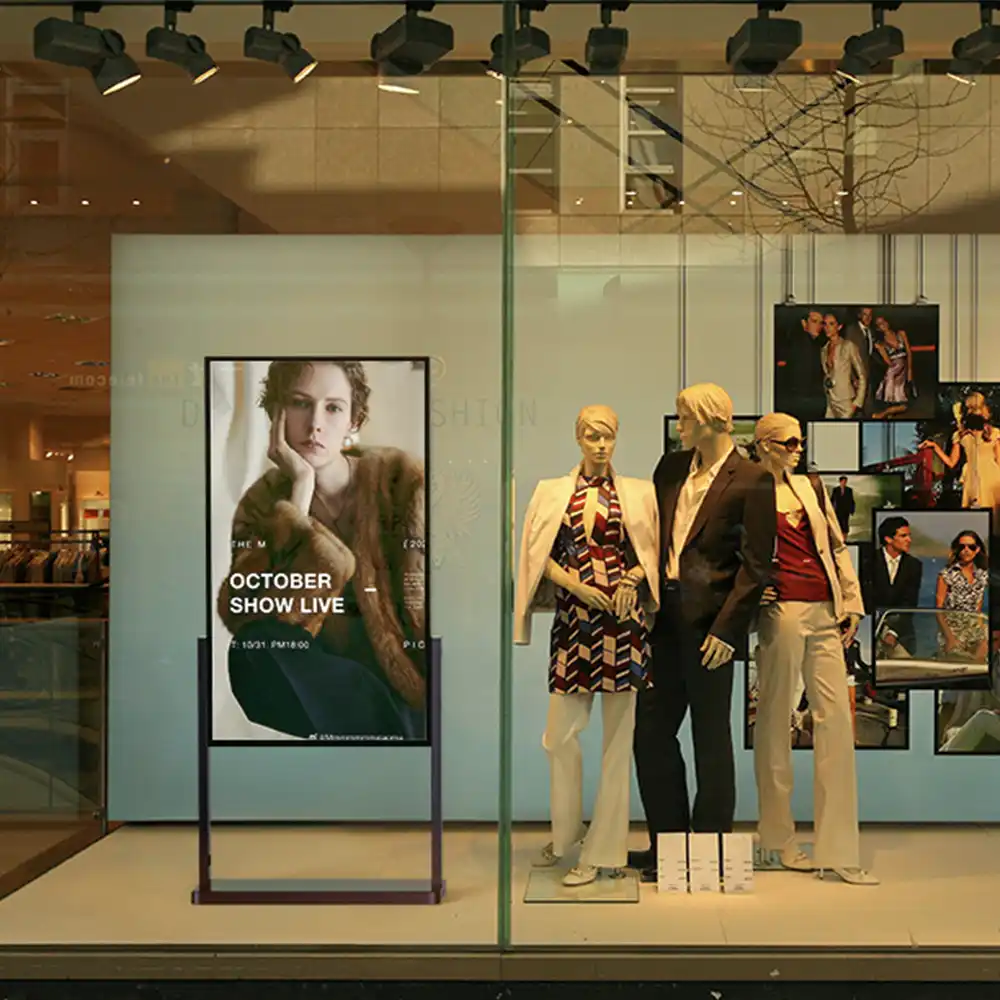
Shop window displays are mounted at eye level for passers-by, facing the main walkway. Inside the store, displays at the checkout or in waiting areas provide additional impulses.
Catering:
Digital menu boards are hung above the counter, clearly visible to all guests. Outdoor displays are installed with weatherproof housings and anti-theft devices.
Company:
Reception displays welcome visitors right at the entrance, and digital door signs are placed in easily accessible locations next to the doors.
Public spaces:
Large LED walls in train stations or airports are positioned so that they are visible from a great distance and from different directions. Maintenance access points are planned to enable quick repairs.
Tips for resellers: How to provide your customers with the best possible advice
- Offer an on-site check or location analysis.
This is the only way to identify all technical and spatial requirements. - Recommend professional mounts and enclosures.
Cheap solutions often lead to problems with stability, security, and maintenance. - Point out the importance of brightness, anti-glare coating, and network connectivity.
Use examples to show how these factors affect the overall impression. - Create an installation checklist and offer maintenance contracts.
This will ensure long-term customer satisfaction and additional sales. - Train your customers in the safe and efficient use of the technology.
A brief introduction can prevent many service requests.
Trends and future prospects
- Mobile installations:
Rollable or temporary displays for events, pop-up stores, or trade shows are gaining in importance. - Sensors and automation:
Sensors control brightness, switch on displays when movement is detected, or adapt content to the target audience. - Integration into building technology:
Digital signage is increasingly being networked with lighting control, access control, and room booking systems. - Sustainability:
Energy-efficient displays, automatic shutdown when not in use, and durable materials are becoming increasingly important.
FAQ – Frequently asked questions about installation and location selection
How high should a digital signage display be mounted?
The ideal height is usually between 1.60 and 1.80 meters to the center of the display, depending on the application and viewing distance. For large rooms or waiting areas, a higher mounting may be appropriate if the viewing angle is correct.
Can I also install digital signage outdoors?
Yes, with weatherproof, IP-certified displays and vandal-proof housings. Pay attention to the temperature range, protection against moisture, and direct sunlight.
What to do if there is no LAN connection?
Many systems support WLAN or mobile communications. However, LAN is often more stable for critical applications. Also check the possibility of redundant connections.
How can I simplify maintenance?
Plan for service hatches, easily accessible technology, and regular maintenance intervals. Document all installation steps.
What needs to be considered with regard to the power supply?
Safe, standard-compliant cabling, sufficient power outlets, and, if necessary, UPS (uninterruptible power supply) are mandatory.
Conclusion: Installation and location—the foundation of your success
A well-thought-out installation and the right choice of location are decisive factors in determining the visibility, security, and impact of your digital signage solution. Only when technology, environment, and content work together optimally will your project deliver maximum added value. Invest in consulting, planning, and professional implementation—it will pay off for your customers and your own business in the long term.